
Are you concerned about identity theft? If you aren’t, you should be.
The Bureau of Justice found that 9% of all persons age 16 and older were victims of identity theft in 2018. 86% of victims experienced “fraudulent use of existing account information.” 12.1% of victims had out of pocket losses of at least a dollar, but the median loss was $100 (with a mean of $640!). Fortunately, 55% of identity theft victims were able to resolve their problems in a day or less.
For $15 a month, you can get identity theft protection from one of the credit bureaus or third party companies. That’s $180 a year!
What if you want identity theft protection but don’t want to (or can’t afford to) spend $180 a year to get it?
Do it yourself.
Here’s how to build your DIY identity theft protection system for free:
There are two big differences between what I outline below and what the paid services offer – post-identity theft recovery and proactive information scanning. I don’t know how good those services are in cleaning things up after identity theft occurs, but that’s one thing I don’t include.
The next is often called “internet scanning,” where they look online to see if your information is floating around. When people sell identity data, it’s usually in the darker parts of the web where you need special software to access. I doubt how diligent these companies are about getting the software, infiltrating the networks, and then just sitting there waiting.
Table of Contents
- Don’t Carry Your Social Security Card
- Secure Your Mail
- Consider Using a P.O. Box
- Monitor & Secure Your Credit
- Review Your Credit Reports
- Set Up Fraud Alerts
- Sign Up for Free Monitoring
- Monitor Your Credit Scores
- Freeze Your Credit Report
- Watch for Strange Activity
- Set Credit Card Transaction Alerts
- Remove Personal Information Found Online
- “Number Lock” Your Phone Number
- Expert Advice on Identity Theft
- Are Identity Theft Protection Services Worth It?
Don’t Carry Your Social Security Card
Let’s get the easy stuff out of the way first. Don’t carry your social security card!
You don’t need it and if you ever lose your wallet, a thief now has everything they need. Your name and address will be on your driver’s license and the holy grail of identity thieves, your social security number, is right next to it.
Just leave the Social Security Card at home.
Secure Your Mail
One of the attack vectors will be through your mail.
Watch for a “Move Validation Letter”
Especially if you haven’t moved!
A thief may try to change your address… fortunately the USPS will send a Mail Validation Letter to the new and old address. If you get one of these but never requested a change, call the 800 number immediately. This is a sign you’re under attack.
If you are going to be away from your mailbox, request a hold. The hold can be for 3 to 30 days and is free.
Stop Getting Junk Mail
OptOutPrescreen.com is your friend. By registering on the site, you can prevent unsolicited offers of credit or insurance, which is one of the easiest ways for someone to steal your credit. Your mailbox is probably insecure so someone could just reach in, steal an application, and get themselves a credit card in your name pretty easily. This website makes it so that you don’t get firm offers for five years (or permanently if you mail a form you print from the site).
If you have an existing relationship with a company, this will not stop those offers. If you have an American Express card, AMEX can still send offers of credit because there’s a pre-existing relationship. To stop that, you’ll need to call them.
(If you want to stop other junk mail, Catalog Choice is a great resource for that)
Consider Using a P.O. Box
Your mailbox is probably just a box with a lid. It’s completely insecure. Mail is often delivered during the day and you are probably working during the day. So for many hours, it sits there for the taking.
A thief could open it, steal your mail, and just walk away. No one would ever know!
The defense against this is to use a PO Box for your financial correspondence. This means all financial accounts so if you do get pre-approved offers of credit, they all go to a secure and locked box at the post office.
While you’re at it, do the same thing with your email by using a classified email address.
Monitor & Secure Your Credit
When identity theft occurs, it will involve your credit reports.
Review Your Credit Reports
The Fair Credit Reporting Act gives you the right to see your credit reports once every 12 months. I use the Waterfall Method and stagger my requests so I see a credit report every 4 months.
As a result of the pandemic, the bureaus temporarily allowed you to get your report every single week. That’s way too often but it’s nice to have that flexibility.
Go to AnnualCreditReport.com to get your free reports.
Set Up Fraud Alerts
Each of the credit bureaus will let you set up 90-day fraud alerts on your account. There are typically two types of fraud alerts, an “initial” alert, and an “extended” alert. The initial alert is for people who are worried they could be a victim of ID theft – that’s you. If you are already a victim, you want an extended fraud alert, which is active for 7 years. The extended request is much more involved and will require you to prove you were a victim of ID theft.
If you set up a fraud alert at one bureau, it will notify the other two, so pick the one you like best:
Sign Up for Free Monitoring
Did you know that all of the credit bureaus offer free monitoring?
Experian and TransUnion always had programs but the recent Equifax hack pushed Equifax to offer theirs for free too.
- Experian Creditworks Basic – No credit card required, free, and they will email you if your account gets an inquiry.
- Transunion TrueIdentity Free – No credit card required, free, and you can lock your credit report for free plus text notifications of suspicious activity.
- Equifax Trusted ID Premier – Most recent one, as a result of the Equifax hack, and you can lock your Equifax report through this system too.
Monitor Your Credit Scores
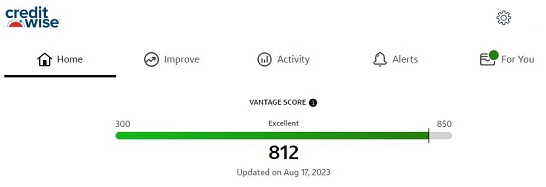
There are several “credit scores” out there, the most “official” one is the FICO credit score.
For identity theft monitoring purposes, you don’t need to see your FICO score. Get any score that is based on a Big Three credit reporting bureau (Equifax, Experian, TransUnion) report.
If something changes on your report, the credit score will be affected. That’s your canary in the coal mine warning that something is happening.
I like to use Credit Sesame or Credit Karma. Credit Sesame uses TransUnion reports and Credit Karma uses Equifax & TransUnion reports. Both are free.
Some credit cards offer a credit score monitor as a credit card perk. For example, CapitalOne calls it CreditWise and it uses TransUnion for their VantageScore 3.0 (the same as Credit Sesame).
Freeze Your Credit Report
This is the (near) nuclear option, but you can put a freeze on your credit report. A freeze restricts access to your credit report, which means creditors will not be able to see it and be willing to extend you any credit. This, in turn, makes it harder for thieves to steal.
Before September 21st, 2018, you had to pay to get your credit report frozen. It is now free, Congress amended the Fair Credit Reporting Act to require credit bureaus to offer a credit freeze for free.
Here are the links to how to freeze your report at each of the three major bureaus:
- Placing an Equifax Credit Freeze
- Placing a TransUnion Credit Freeze
- Placing an Experian Credit Freeze
That’s it! Now you have your own identity theft protection system without having to pay $180 a year!
(if you do want a service, you can check our review of Identity Guard)
Watch for Strange Activity
Finally, this collection of tasks is for “everything else” that can happen in a theft (or things you can do to help prevent it).
Set Credit Card Transaction Alerts
I set transaction alerts on all my credit cards for the minimum amount.
Some cards let you set that limit at $0, others say $1 or more, but they all have this as an option. I get email notifications.
The notifications come instantly and have already paid dividends because within a week of doing it (coincidence, I assure you) I was notified of two fraudulent transactions!
Remove Personal Information Found Online
There’s a tremendous amount of publicly available information and plenty of websites who compile that information so they can sell it to private individuals.
By law, they’re required to remove it if you ask but it’s a bit like playing Whack A Mole – there’s always another website out there listing your information.
It’s still important to try to remove that information whenever possible.
To do it manually, just search for yourself and go to each website that lists your information and follow their policy for removal. You can also sign up for a service like DeleteMe and pay to have them do it. (they also have a guide to help you do it manually yourself)
Google, as the most popular search engine, has a policy for removing personal information from their search results as well as a form you can fill out to remove it. Through that form, you can remove:
- Confidential government identification (ID) numbers, like US Social Security Number, Argentine Single Tax Identification Number, Brazil Cadastro de pessoas Físicas, Korea Resident Registration Number, or China Resident Identity Card
- Bank account numbers
- Credit card numbers
- Images of handwritten signatures
- Images of ID docs
- Highly personal, restricted, and official records, like medical records
- Personal contact info (physical addresses, phone numbers, and email addresses)
- Confidential login credentials
“Number Lock” Your Phone Number
If you turn on two-factor authorization, the code is usually sent to your phone number. That makes your phone a very enticing target, so turn on “Number Lock” (that’s what Verizon, my carrier, calls it). This ensures that the phone number cannot be ported or transferred without your authorization.
Here is Verizon’s FAQ answer on how it works:
This is not typically turned on by default.
What is a Number Lock?
If a scammer gets your personal information, they could transfer your mobile number to another carrier. This may be referred to as an unauthorized port out. Then, they could get your calls and texts to take control of other accounts, like banking and social media.You can set up a Number Lock for free to protect your mobile number from an unauthorized transfer. Once a lock is set up for a number, that number cannot be ported to another line/carrier unless you remove the lock. You can set up a Number Lock with the My Verizon website and app or by calling Customer Service at *611.
Expert Advice on Identity Theft
We reached out to Professor Yingying Chen, Professor in the Department of Electrical and Computer Engineering at Rutgers University and Associate Director of WINLAB, for some advice about protecting yourself against identity theft that touches on the cutting edge of identity (such as gait pattern recognition):

Q1. What are some common sense ways consumers can protect themselves from identity theft beyond securing their obviously sensitive information like Social Security Numbers?
A1. The emerging sensing technologies have enabled many new user authentication/identification methods, which use various identity information to recognize users, for example, fingerprints, faces, irises, and gestures. While these new authentication/identification methods are convenient to use, consumers should be aware that such biometric information could be easily stolen if the consumers do not actively protect them in public. Identity theft could stalk consumers and try to obtain their identity information without interacting with consumers. For example, fingerprints could be obtained from any surfaces that have been touched by the consumers, faces, irises, and gestures could be captured by smartphone cameras from remote.
Identity theft could also utilize sensors in smartphones or smartwatches to steal consumers’ behavioral biometric information, which could also be utilized to identify people. For instance, gait patterns, hand movements, driving behaviors, etc. Therefore, consumers of smartphones and smartwatches should also be cautious when installing apps from unknown developers, who could obtain the permission of using the integrated sensors and steal the consumers’ identity information.
Q2. If consumers are going to pay for an identity theft protection service, what are some things they should consider?
A2. Consumers should first consider the user experience of the identity theft protection service. More specifically, an identity theft protection service should be non-invasive, which means no interruption to consumers’ daily activities. Second, the identity theft protection service should have a strong security team to make sure the service will not be exploited by identity theft to attack consumers. Third, the service should be easy to use. It shouldn’t require consumers to take a lot of effort into collecting data.
Q3. Do you have any advice for people who are very worried about becoming victims of identity theft?
I think it is necessary to be worried about becoming victims of identity theft, especially these days with so many high-tech sensor-enabled mobile devices. I would advise the people who are worried about becoming victims of identity theft to not trust anyone that you do not know in person. They should take proactive approaches to prevent using their identity in public.
Are Identity Theft Protection Services Worth It?
Every year, there seems to be some massive credit card hack at a retailer. The biggest in recent memory was when thieves sole data on 37 million customers of T-Mobile in 2023.
In each case, affected customers were given free identity theft protection services from one of the big companies – Lifelock, Identity Guard, or Identity Force.
While it feels good to get something free after you’ve had your information stolen, is it really worth it?
What These Services Offer
There’s no way to protect you from having your identity stolen.
What they offer is “constant” monitoring of your credit reports so they can catch the symptoms of identity theft as early as possible. They look for suspicious activity like unauthorized credit pulls that might indicate someone is opening up a credit card in your name, and alert you.
By catching issues as early as possible, repairing them becomes much easier and faster.
A few years ago, something suspicious happened to me and my credit report. Someone had used a similar social security number to mine to get a cell phone. There wasn’t any identity theft but it was curious because a second Social Security Number, a new address, and a credit pull appeared on my credit report. I didn’t detect it until much later but an identity theft protection service would’ve seen these (as anyone looking would) as being strange and alerted me.
Are They Worth It?
We took a closer look at the LifeLock service as well as Identity Guard. We realized that those companies offer identity theft monitoring capabilities you can do yourself (as I’ve outlined above). You can get a very close approximation by using the Waterfall Method in requesting your credit reports.
The one thing that cannot be done for free is the, typically $1 million dollar insurance plan. With Lifelock, for example, you get a laundry list of benefits if you’re the victim of identity theft:
- Replacement of documents – the cost of replacing documents, including driver’s licenses, passports (passport photos may not be included), birth certificates, marriage certificates, and stock certificates, as well as the cost to obtain police reports and the cost of additional legal expenses such as affidavits and notarizations required in connection with replacing documents as a result of a Stolen Identity Event
- Traveling expenses – reasonable expenses, including gas, parking and airline tickets, incurred in traveling to obtain replacement documents, to attend meetings or proceedings, or to rectify records as a result of a Stolen Identity Event
- Loss of income – actual lost income for time necessarily taken off work and away from your work premises, whether whole or partial days, including vacation days, floating holidays and discretionary days but not sick days or time taken away from self-employment, solely as a result of your efforts to amend or rectify records relating to your true name or identity as a result of a Stolen Identity Event
- Stolen handbag, purse or wallet – actual cost of replacing your stolen handbag, purse or wallet in addition to replacing the cash contained therein, as a result of a Stolen Identity Event. No coverage will be provided unless the theft is reported to law enforcement within twenty-four (24) hours of the incident.
- Childcare and elderly care – actual cost of providing additional childcare or care of elderly relatives that you are directly responsible for while having to travel to replace documents, attend meetings or proceedings, or rectify records as a result of a Stolen Identity Event
- Travel Assistance – reasonable additional expenses incurred to obtain duplicate, replacement or new travel documents, including passports and airline tickets, as well as additional reasonable travel and lodging expenses incurred to enable you to return to your permanent residence as a result of a Stolen Identity Event
- Fraudulent withdrawals – the principal amount of money you have lost resulting from an unauthorized transfer of monies from one or more of your checking, savings, money market, or other financial accounts, or from the theft of a tax refund obtained or secured by the filing of a fraudulent tax return with the Internal Revenue Service or the taxing authority of a U.S. State, unless you have received reimbursement from another source or failed to request reimbursement from the entity holding the account from which funds were stolen
- Legal costs – reasonable and necessary expenses paid to lawyers and other legal professionals appointed by us and with our consent in connection with remediating a Stolen Identity Event, including defending any civil lawsuit filed against you, removing any civil judgment entered against you, defending you against any criminal charges filed against you due to the actions of another while using your identity, and assisting you with an audit or other proceeding or hearing conducted by a governmental agency as a result of a Stolen Identity Event
- Remediation services costs – reasonable and necessary expenses paid to investigators with our consent and retained by us in connection with remediating a Stolen Identity Event, including the costs of recovering control of your personal identity and recovering losses you incurred
- Case management services costs – expenses paid to an identity restoration case manager, as needed and approved by us, or incurred by us in complex Stolen Identity Events
You can’t DIY those reimbursements (stolen handbag, purse or wallet insurance!?) and they could be significant in some cases, though there are limits to the insurance coverage. The often quoted dollar amount, like $1,000,000, usually refers to the last two line items – remediation services and case management services. Those will be the most expensive anyway.
That’s why I consider the identity theft protection services as more of an insurance policy that has a bonus monitoring service, and not the other way around.
One other consideration, and I’m not entirely convinced about the frequency, but many of these programs also offer child protection as a monthly add-on. Child identity theft is especially hard to detect because we often aren’t looking for it. I’ve never requested a credit report or my kids, though technically they’re each permitted a free report from each bureau every year!
(finally, there’s always the issue of mail theft or package theft, which no monitoring service can prevent)
Do you use an identity theft protection service like Lifelock, Identity Guard, or Identity Force? (there are easily a dozen of these types of companies, I just listed some of the more popular ones)











Identity theft is scary stuff. I know we have had a few recent fraudulent credit card purchases on different cards over the past few months. I’m wondering if there’s a subscription service that we are signed up for that has a leak.
Thanks for the list.